


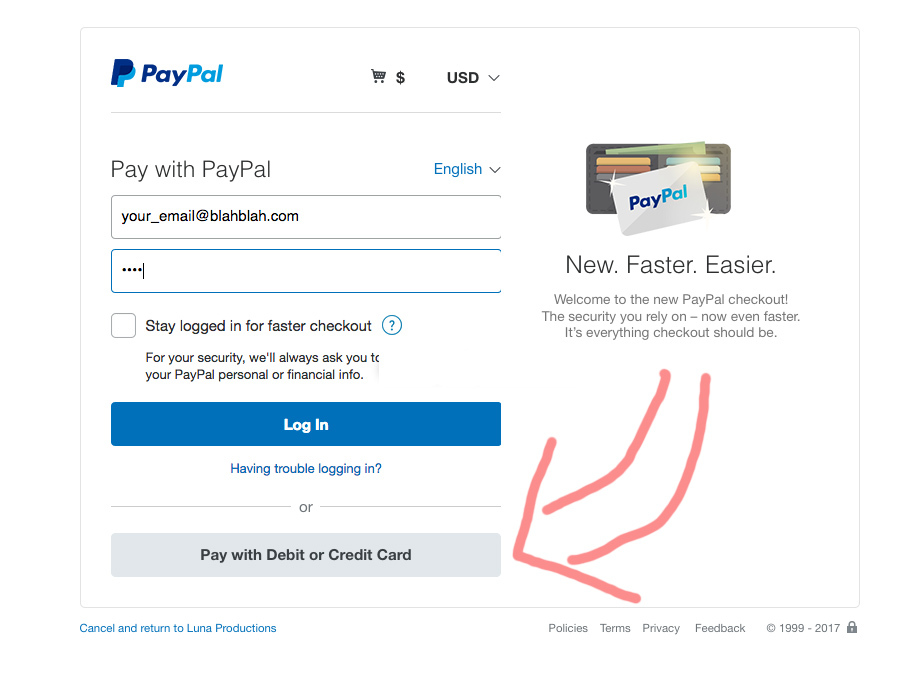
How to Pay with Credit Card through PayPal without PayPal Account via UberWeedsCanada.com
0 comments
How to Pay with Credit Card through PayPal without PayPal Account, step-by-step instruction:
- Press button “Pay With Debit or Credit Card”. (Do not press “Log in” button)
- OPTIONAL: After submit button pressed will be opened Payment Form. In some countries it is possible 2 payment ways – Bank Transfer and Credit Card, in others only Credit Card. Select preferred way.
- Complete all required form fields, check information and press button “Pay Now”.
- OPTIONAL: After payment press button “Return to Merchant”.


How to Pay with Credit Card through PayPal without PayPal Account, step-by-step instruction: Press button “Pay With Debit or Credit Card”. (Do not press “Log in” button) OPTIONAL: After submit button pressed will be opened Payment Form. In some countries it is possible 2 payment ways – Bank Transfer and Credit Card, in others only … Continue reading “How to Pay with Credit Card through PayPal without PayPal Account via UberWeedsCanada.com”Read More


